Wireframing
User Feedback & Testing
User Research
HCI Principles
Web Design
Accessibility
Process of Interaction Design SPRINT Case Study: NotebookLm
Timeline: November 2025 ~ December 2025
NotebookLM is a powerful tool used by graduate students to organize readings, generate explanations, and summarize complex PDFs. However, despite its powerful backend, the interface suffers from fundamental interaction flaws. Users often struggle to understand how different actions affect their data, receive little to no confirmation when tasks complete, and find it difficult to predict what specific, and in this case study we will target three most faced issue.
View Final Prototype
View Original Site
Team
The Prototypers (Sakshi, Ben & Petra)
Role
Masters Students - Human Centered Computing
Target Users:
Beginners use NotebookLM to organize PDFs, summarize documents, and prepare study materials, but face significant usability issues.
The current system has critical issues with mapping (unclear workflows), feedback (unexplained action results), and information scent (users don't know what to do next after generating content).
Problem Statement:
Why Redesign?
HCC graduate students who are beginners with NotebookLM
HCC graduate students struggle with unclear workflows, inadequate feedback, and poor information scent when organizing PDFs and generating study materials.
Skills
UI Redesign
User Flow Mapping
Wireframing
Design Principles
Usability Heuristics
User Testing & Feedback
User Research
Challenges:
Tools
Figma
Gen AI
G-Meet
Google Docs
Prototyping & Wireframing
Behance (UI Design Inspiration)
UX Research - Specific Problems
Design Process
The Solution (Redesign Details)
User Testing
Final Prototype
Reflection & Learnings
Collaborative sketching allowed us to merge the best parts of three distinct ideas (My layout, Ben's copy, Petra's visuals). The use of distinct "Mapping," "Feedback," and "Scent" heuristics provided a strong framework for decision-making, ensuring we weren't just designing for aesthetics, but for usability.
References
Behance. (n.d.). AI study tool web designs - Search results. Behance. We referred to various web design projects on Behance to gather inspiration for the NotebookLM redesign. These references guided the visual style, layout, and interactive elements to enhance user experience and usability.
https://www.behance.net/search/projects/ai%20study%20web%20design?tracking_source=typeahead_search_direct
Derocher, A. E., Lunn, N.J., & Stirling, I. (2004). Polar bears in a warming climate. Integrative and Comparative Biology, 44(2), 163-176. https://doi.org/10.1093/icb/44.2.163 (This website was used to demonstrate the feedback issue present in the original design.)
Kotturi Y. November 20, 2025 PowerPoint “Interaction Design Rules (Part 1)”, slide 29
Kotturi Y. November 23, 2025 PowerPoint “Information Design”, slides 17-28
Norman, D. (2013). The design of everyday things: Revised and Expanded Edition. Constellation. pp. 11,20-23
OpenAI. (2025). ChatGPT (GPT-5.1) LLM https://chat.openai.com/ ChatGPT was used to help rephrase and improve the content displayed inside NotebookLM in the redesigns, making it easier to read and understand.
Rogers, Y., Sharp, H., & Preece, J. (2023). Interaction design, beyond human-centered interaction (6th ed.). Wiley.
Grammarly & Google Gemine was used to correct errors in spelling, grammar, and sentence structure.
Design Concepts
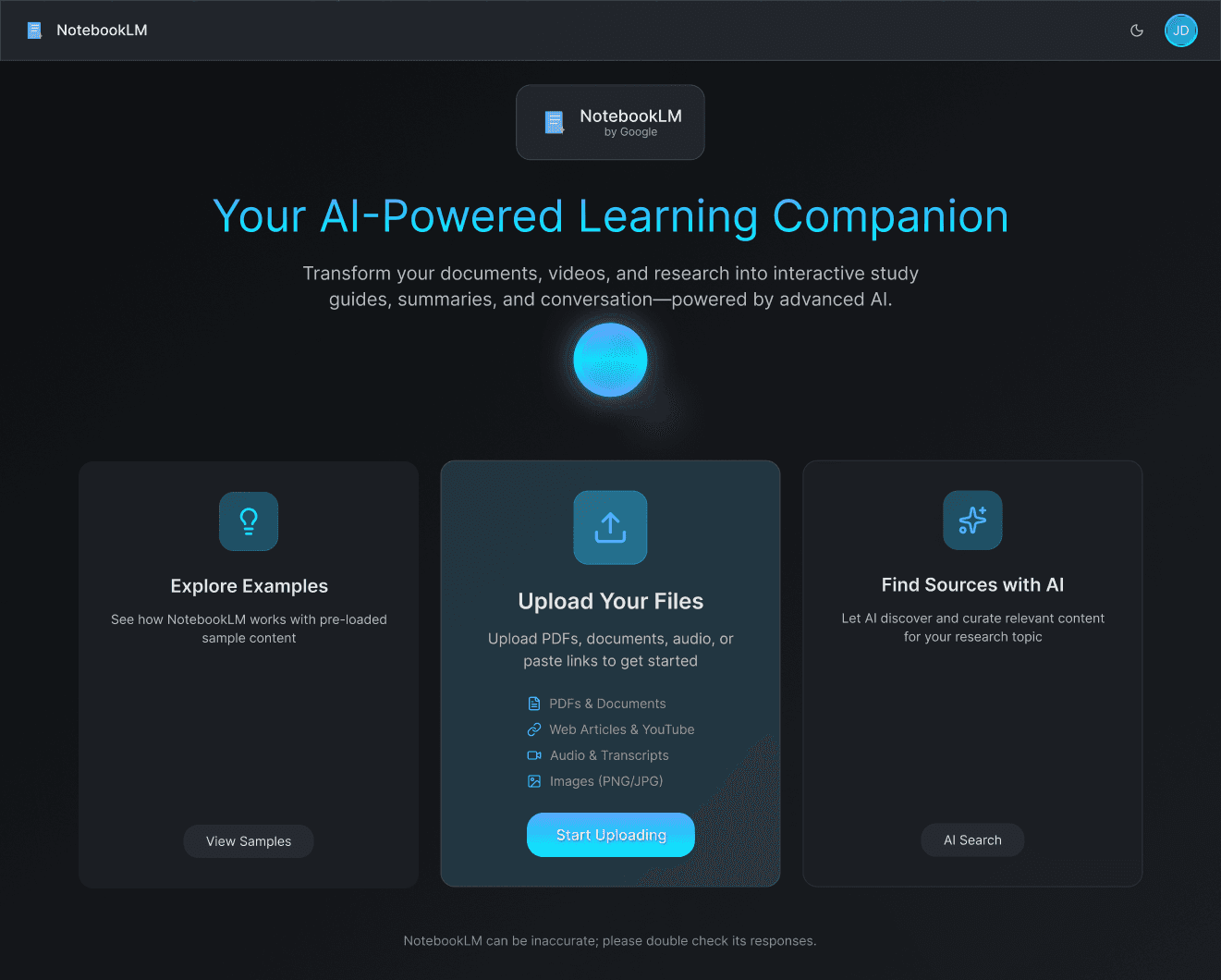
Using Figma, I developed a modern and structured redesign applying interaction design rules throughout:
Visibility: Clear product cards, strong headings, and highlighted CTAs make navigation intuitive.
Constraints: Filters and segmented categories (Residential, Commercial, Garden Gates) guide user exploration logically.
Affordance: Interactive elements like product cards, buttons, and input fields are visually designed to suggest their function.
Feedback: Hover animations, active link states, and loading indicators give users real-time confirmation.
Consistency: Unified typography, colour palette, button styles, and iconography create a cohesive look and feel.
Signifiers: Buttons, links, and clickable cards visually stand out with shadows and hover effects, reducing ambiguity.
Mapping: Site navigation matches user intent—directing them from product discovery → selection → inquiry seamlessly.
Observations
Team observed confusion points and mapped issues to design concepts:
"I clicked ‘Discover Sources’ expecting examples of what kind of files I could upload - instead, it opened an AI search window. I was confused and backed out." — User Observation
Mapping Issues
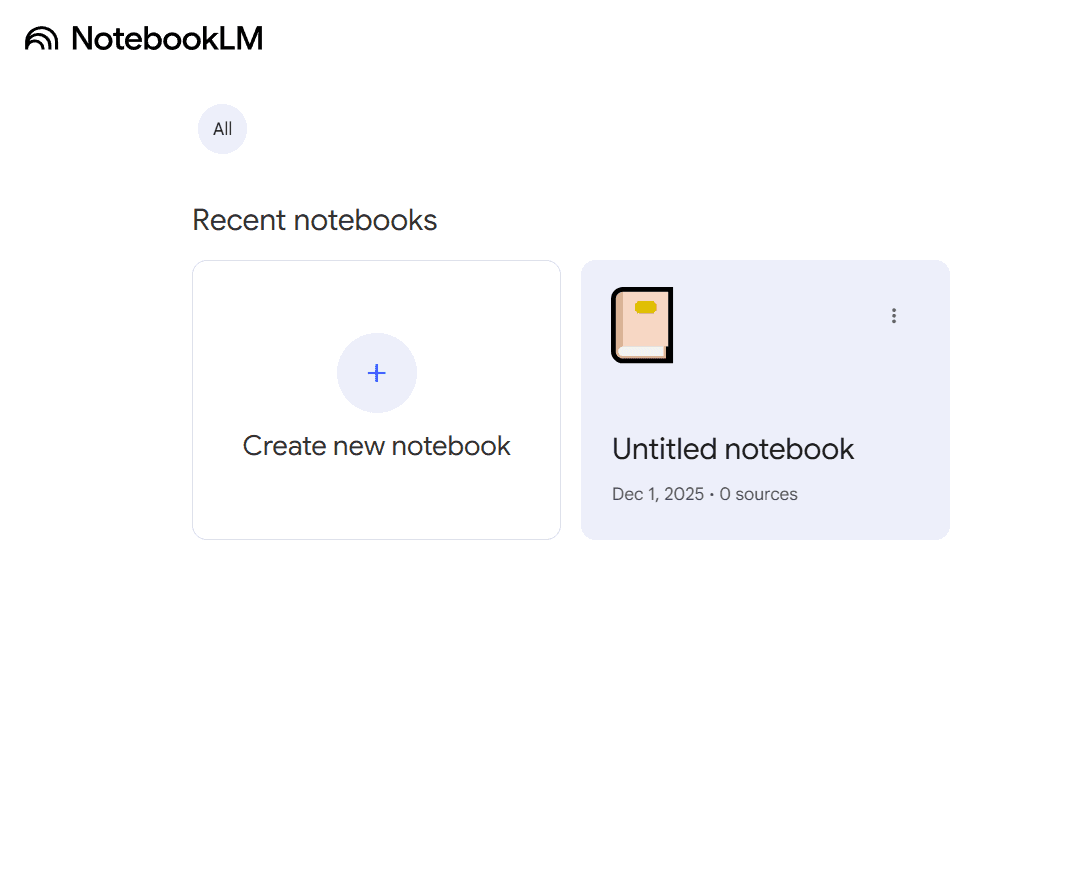
Mental Model Mismatch, users struggle to correlate buttons with their outcomes. For example, the "Discover Sources" button sounds like a library browsing feature but actually launches an AI search chat, causing confusion.
Feedback Issues
System Status Visibility, the system fails to confirm actions. When a user uploads a PDF or generates a summary, there is no toast notification, progress bar, or success state. Users often re-upload files multiple times, thinking the system failed.
Information Scent
Navigation Cues, after a report is generated, the interface provides no clear "next step." Users are left wondering if they can download, edit, or move the content, leading to low interaction confidence.
1
2
3
Understand & Map
Sketching (Divergent Thinking)
Decision & Convergence
We began by mapping the current user journey for a novice student attempting to upload a PDF and generate study notes.
Each team member generated 3-6 distinct sketches to solve the identified issues.
We used a structured dot-voting method to select the strongest features from each sketch. We chose to move forward with a unified concept that featured:
Pain Point Identification: We located the exact moments where users hesitated or "flailed" (clicked randomly).
Competitive Analysis: We compared the feedback loops of ChatGPT and Perplexity to identify industry standards for AI system status updates.
Sakshi's Concept: Focused on clearer hierarchy, renaming "Discover Sources" to "AI Source Finder," and adding "Toast" notifications for saved items.
Ben's Concept: Focused on explanatory text (micro-copy) to explain what AI tools do before the user clicks.
Petra's Concept: Focused on a modular grid layout for previous uploads to improve scanability.
A "Card-based" home screen for clearer entry points.
Explicit confirmation pop-ups (Feedback).
Renamed navigation labels to match user intent (Mapping).
1
2
3
Improving Mapping
Enhancing Feedback
Strengthening Information Scent
The Fix: We renamed the ambiguous "Discover Sources" button to "AI Source Finder" and moved it to a dedicated card layout on the dashboard alongside "Create New Notebook."
Evidence: This aligns the system image with the user's mental model. Users now understand that clicking the button initiates an active search process rather than a passive browsing experience.
The Fix: We implemented clear, immediate system status updates.
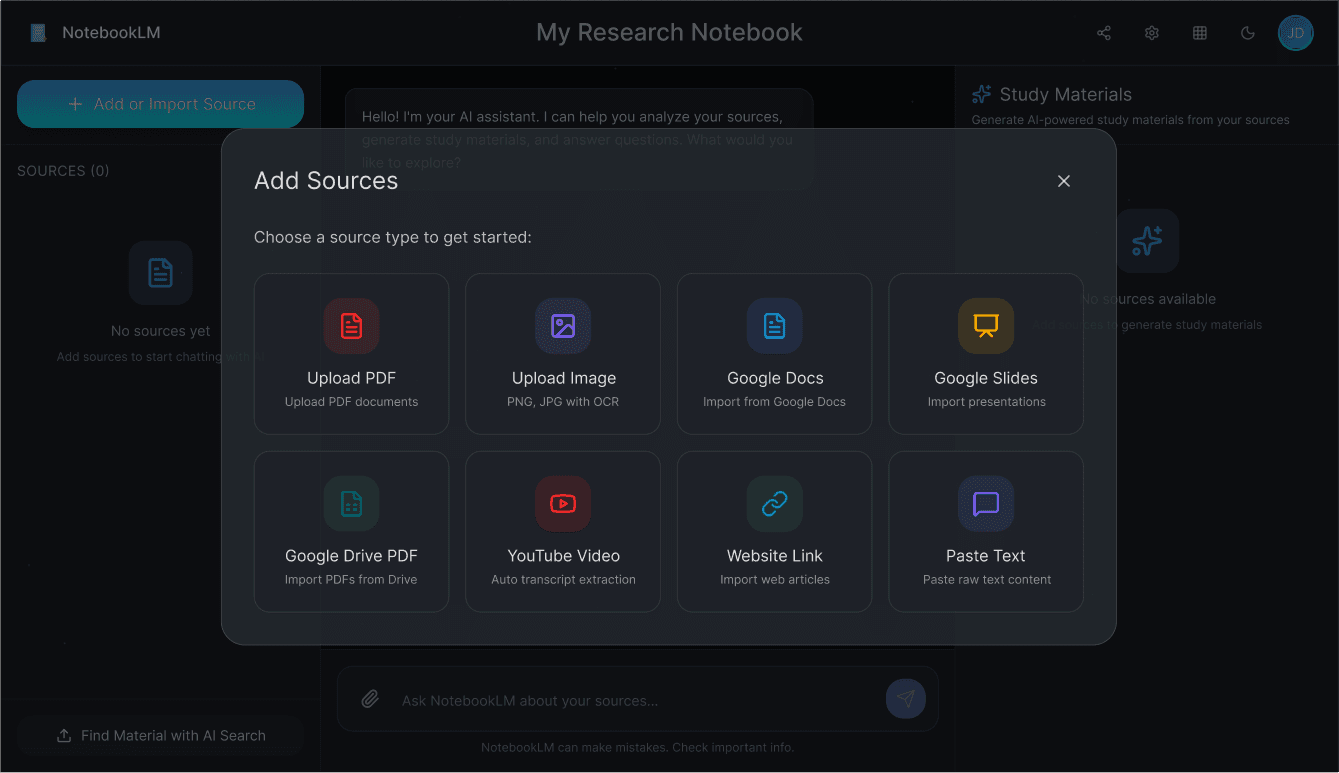
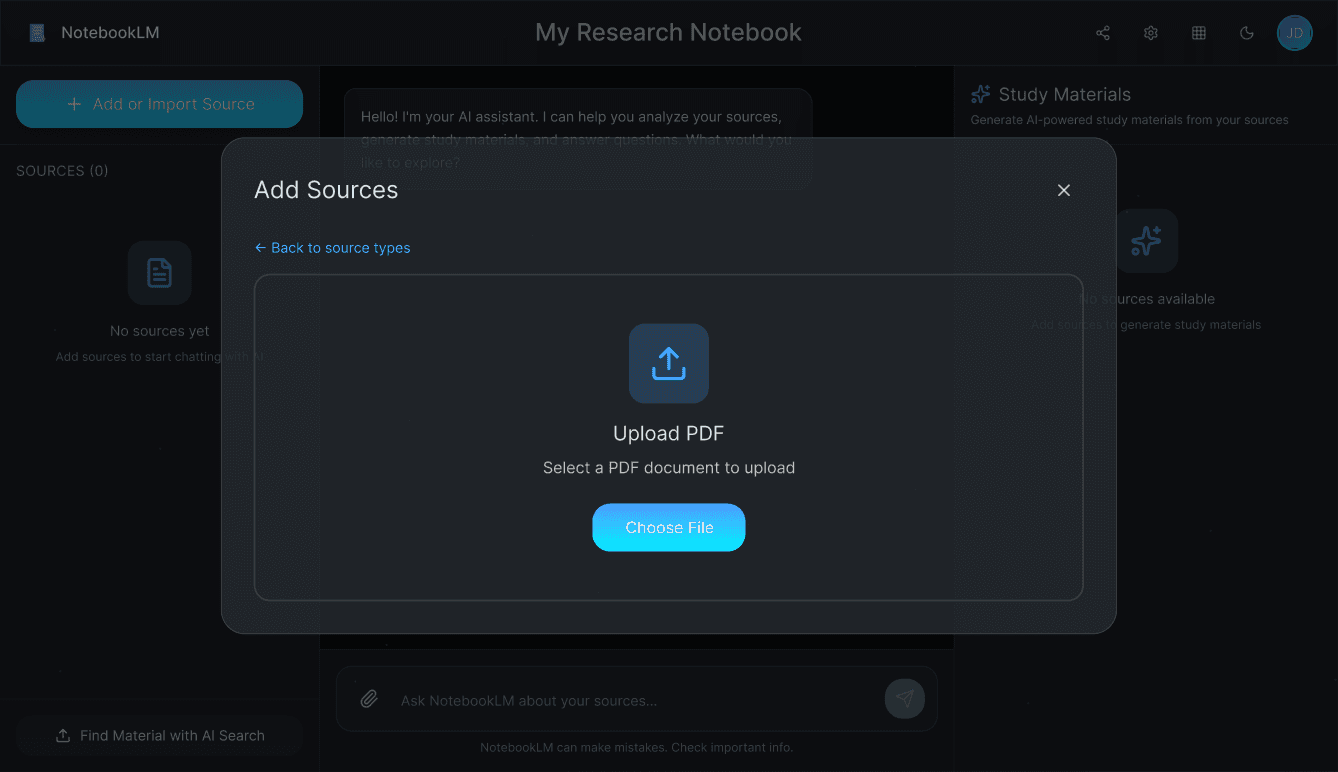
Uploads: A specific "Reading [Filename]..." status bar appears during upload.
Completion: A "Source Successfully Added" banner appears with a green checkmark upon completion.
Evidence: As noted, Interaction Design principles, feedback confirms that a request was registered. This prevents the "duplicate upload" error where users unknowingly flood the AI context window with the same file multiple times.
The Fix: We redesigned the "Report Generation" output.
Added prominent Copy and View icons to the sidebar notes.
Included micro-copy explicitly stating "Report generated from [X] sources."
Evidence: By increasing the "scent" of the next available action (Copy/View), we reduced the cognitive load required for the user to figure out how to export their work.
User Participants
After the first iteration of design sprint, we conducted usability testing with three HCC graduate students (mix of novice and moderate users).
Also measured Time to Task Completion and collected qualitative feedback.
HCC User 1
(Moderate user)
Prototype Task time : 1:07
Existing Website time: 0:52
Positive Feedback
✓
Design easy to follow
✓
Good color theory uses, color combinations and typography is very clean
✓
Notification clarity
✓
Improved mapping
Concern
Reduce homepage scrolling
HCC User 2
(Beginner user)
Prototype Task time : 1:37
Existing Website time: 1:08
Positive Feedback
✓
Buttons are clear; easy to know next steps
✓
Loved dark mode with deep blue accents
✓
Upload icons improved and engagement
✓
Better feedback after actions
Concern
Label "Notes" clearly.
Ability to type inside notes
HCC User 3
(Beginner user)
Prototype Task time : 1:14
Existing Website time: 0:55
Positive Feedback
✓
Clear instructions and easily recognizable symbols
✓
Liked upload symbols for easy learnability
Concern
Copy button too small (Fitts's law)
Stronger header statement
View Final Prototype
Iteration (Sprint 2 Improvements)
1
2
Fitts's Law Adjustment:
State Activation:
Increased the clickable area of the "Copy" and "Report" buttons and moved them closer to the user's natural cursor resting position.
Based on Tester 2's feedback regarding Fitts's Law (some buttons were too small or hard to reach), we made significant changes in the final high-fidelity prototype:
Activated previously grayed-out buttons (Mind Map, Flashcards) to allow for a more non-linear user flow.
3
Scroll Fix:
Reduced vertical scrolling on the homepage to keep key actions "above the fold."
sakshi.guides
UX Product Designer creating human-centered digital experiences that turn complex problems into intuitive solutions.
Turning pixels into purpose, one experience at a time.
Download Resume
Crafted with
+ curiosity
© 2025 Sakshi Jaju. All rights reserved.